How to install
Requirements
WEASEL Pipeline is based on the following dependencies:
Linux-based OS - may work with MacOS or Windows, but this is not tested.
Python 3.6 or higher - may work with older versions, but this is not tested.
RabbitMQ with Queue length support - should be included in any recent version.
Python 3
First, verify you have Python 3 and pip installed, otherwise install it. For example, on a Debian/Ubuntu system you may execute:
sudo apt-get install python3 python3-pip python3-dev
RabbitMQ
The different elements in a WEASEL Pipeline based tool chain are interconnected by using message queues. Specifically, we use the RabbitMQ server. If you do not have a running RabbitMQ server yet, you need to install one now.
Debian/Ubuntu
On a Debian/Ubuntu system you may execute:
sudo apt-get install rabbitmq-server
For development and debugging, we suggest to enable the management plugin, which provides a nice Web UI to see what is happening on the server.
sudo rabbitmq-plugins enable rabbitmq_management
Docker
If you use Docker, you can also use a Docker container to run a local RabbitMQ server for development and testing:
sudo docker run --rm -it -p 5672:5672 -p 15672:15672 rabbitmq:management-alpine
Access the web interface
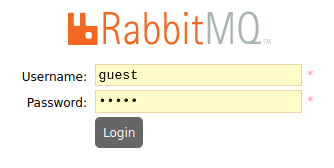
You can access the UI here . The default username and password are guest
The complete RabbitMQ Documentation can be found here.
Virtual environment
For development purposes, we suggest to use a Python virtual environment instead of installing Python packages directly to your system folders. If you do not have a virtual environment yet, now is a good time to create one!
sudo apt-get install python3-venv
cd /path/to/your/project # Replace with the folder where you want to put your code
python3 -m venv venv
source venv/bin/activate # This needs to be repeated every time you open a new terminal to activate the virtual environment!
More information about Python virtual environments can be found here.
Install WEASEL Pipeline
After you have followed the steps above, you should be ready to install WEASEL pipeline. This is done via pip:
pip install weasel-pipeline